Showing posts with label foobar2000. Show all posts

foobar2000 v0.9.6 released

foobar2000 新版 0.9.6 推出,加入的新功能如下,
  1. 安裝選項新增Portable Mode,將所有設定檔案皆放在foobar2000資料夾中。方便移轉攜帶。
  2. Folder Watching,自動追蹤Media Library資料夾中的變化,不需再手動掃瞄變更。
  3. 內建支援 Matroska 檔案。
  4. 其餘說明 Release Notes
Download。
read on
Posted at 3:54 PM on 11/30/08 | 4 comments
Filed under:
 

foobar2000 評分更新

之前已經寫了一篇介紹評分的文章,但是又有更方便的插件,省去一大堆設定。

所需套件:Playback Statistics (來自foobar2000)

1. 將 foo_playcount.dll 放到 components 資料夾下。

2. Preferences 中,Display -> Default User Interface -> Playlist View。加入一個新的欄位 Rating。值可參照下圖


輸入
$repeat($char(9733),%rating%)
或是
$pad($repeat(★,%rating%), 5,✩)

3. 成果如下


Link : foobar2000 討論區
read on
Posted at 9:11 PM on 8/3/08 | 0 comments
Filed under:
 

為 foobar2000 加入歌曲評分功能

有時候常常聽到某一首歌,覺得很好聽。但是下次想要再找出那首歌時,卻忘記那是誰的歌或是忘記是在哪張專輯中。評分功能,可以幫助我們快速判斷。

所需套件:Quick Tagger (foo quicktag) 放到 components 資料夾下。

1. 到 Preferences 中,Tools -> Tagging -> Quick Tagger。增加一個欄位 Rating,值就依照想分幾級而定, 以 ; 號隔開。下方 Require confirmation..... 表示評分幾首歌以上時需確認。


2. Preferences 中,Display -> Default User Interface -> Playlist View。加入一個新的欄位 Rating,值
$repeat($char(9733),%rating%)


其中的 char(9733) 代表的是星星的圖樣,設定請參考 Unicode 文件,或是到這裡有快速的索引。

3. 在播放清單的標題列上按右鍵,Columns -> Rating 打勾。清單中就會出現評分的欄位。


4. 要對歌曲評分,按右鍵,Tagging -> Quick Tagger -> Set Rating to...


5. 但是這樣選單太多層,不是很方便。所以往上移出來。
Preferences 中,Display -> Context Menu 中,找到 Quick Tagger ,可以直接拖拉到最上層。


也順便把一些常用的功能移出來,如 Get Tags From freedb。
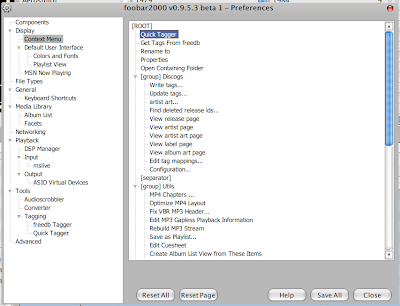


6. 也可以加入到快捷鍵中,General -> Keyboard Shortcuts


7. 收工。

以上簡單來說就是在音樂檔 Tag 中,加入欄位,表示對歌曲的評分。也可以加入其他欄位,如購買日期,心情 (失戀專用 ? )等等,就依照個人需求。

當然還有其他方法,例如利用 foo_rating,或是 foo_masstag。但是 foo_rating 需要 Columns UI 介面,這在新版 foobar2000 0.9.5版出來後,我便拋棄 Columns UI 了,雖然它可以做出很多很炫的介面特效。而 foo_masstag 又覺得麻煩,設定步驟比較多,所以介紹簡單又方便的 foo_quicktag。

Simple is the best.
read on
Posted at 3:01 AM on 5/17/08 | 3 comments
Filed under:
 

Online Metal Radio

在BBS上看到,Pirate Radio KQLZ,一家在LA的電台,以Glam/Hair Metal 為主,收聽網址。居然還有提供128k的品質。

另一個是之前常聽後來停站的 Metal Storm Radio,不過在它首頁的連結倒是提供了另一個金屬電台,Epic Rock Radio,以Power/Symphonic Metal為主,非常好的一點,有提供Request點歌服務。

聽網路電台,常常都會需要用它們提供的服務如Live365,或是要另開網頁,這實在非常不方便。還好在foobar2000中,有個套件mslive,可以在foobar2000中播放mms/rstp等串流服務。再配合Orbit Downloader,抓出網址。

1.先在網頁中Media Player介面上按右鍵,Grab it 下載。


2.自動跳到Orbit Downloader,複製連結位址。


3.加入到foobar2000中。

read on
Posted at 2:57 AM on 2/16/08 | 2 comments
Filed under: , ,
 

foobar2000 v0.9.5 beta 7

foobar2000 0.9.5 beta版本中改進原本的預設介面。新的 Default User Interface 直接可以顯示專輯圖片,不必再安裝外掛。同時也提供簡易Layout Edit,方便改變整體外觀。更多資訊擷圖請參考Release notes。

新的版本真的是太方便了,一下子就可以弄出如下的介面。


對我來說,我其實不太喜歡太花俏的介面,反正foobar2000執行之後還不都是最小化,foobar2000的特色不正是簡單,佔用資源小,而音質又好嗎。與其要花費那麼多時間改介面,那直接改用iTunes就好啦。

我只需要能夠按照音樂類型,藝人,專輯等分類,有Rating的功能可以評分,紀錄喜歡的歌曲。頂多再加上專輯圖片的功能,這樣對我來說就夠了。我只有另外加上Facets 跟 Quick Tagger。

不過顯示分類方便之後,又是另一件麻煩事。有太多檔案的音樂類型要重新修正,總不能所有樂團都是Rock.....

唉,聽爽就好,管他是symphonic還是gothic。

參考資料,allmusic,metal-archives,金屬流派另類釋義 XD。
read on
Posted at 5:51 AM on 12/10/07 | 3 comments
Filed under:
 

在 foobar2000 顯示專輯圖片

所需套件:Columns UI、foo_uie_albumart,放到 compents 資料夾下。

打開選項 Preferences,到 Display -> Columns UI,選 Layout 頁,
選擇圖片要出現的位置,按右鍵新增 Insert Panel -> Panels -> Album Art。


選取Album Art,按旁邊 Configure,第一行改成
$replace(%path%,%filename_ext%,)*.jpg


收工。

以後專輯圖片只要放到歌曲同一個資料夾中,就會在 forrbar2000 中出現。

read on
Posted at 8:46 AM on 7/6/07 | 0 comments
Filed under: